Refactoring with AI: A Step-by-Step Strategy for Modernizing Legacy Code
How to use AI coding assistants for safe, incremental refactoring — scoping the work, writing safety tests, reviewing generated diffs, and avoiding common pitfalls.
Refactoring with AI is tempting because it feels like a way to finally tackle the module nobody wants to touch. But the same speed that makes AI useful for greenfield code makes it dangerous in legacy refactoring — it can blow past your intended scope, silently drop behavior that looks like dead code but isn’t, or generate cleaner-looking code that doesn’t preserve the original semantics.
AI is actually excellent at refactoring. The discipline is in the setup, not the generation.
Establish a test baseline before touching any code
The cardinal rule of refactoring is that you need tests to know whether you broke something. With AI-generated refactors, this rule is even more critical because the model can confidently produce code that looks right but diverges in subtle ways.
Before giving the AI any refactoring task, run the existing test suite and record the baseline:
npm test -- --coverage 2>&1 | tee baseline-tests.txtIf coverage is low on the code you’re refactoring, write characterization tests first. A characterization test isn’t about correctness — it’s about capturing what the code currently does, so you can detect drift after the refactor.
// Characterization test for a function you're about to refactor
describe('processOrder (characterization)', () => {
  it('returns the same output for known inputs', () => {
    const result = processOrder({ id: 42, items: [], discount: 0 });
    expect(result).toMatchSnapshot();
  });
});
Snapshot tests are particularly useful here — they capture the entire output shape without you having to specify what’s “correct.” When the refactor changes behavior unexpectedly, snapshots fail and tell you exactly what shifted.
You can use AI to generate these characterization tests faster. See Writing Tests with AI for how to prompt effectively for this.
Scope the refactor to a single concern
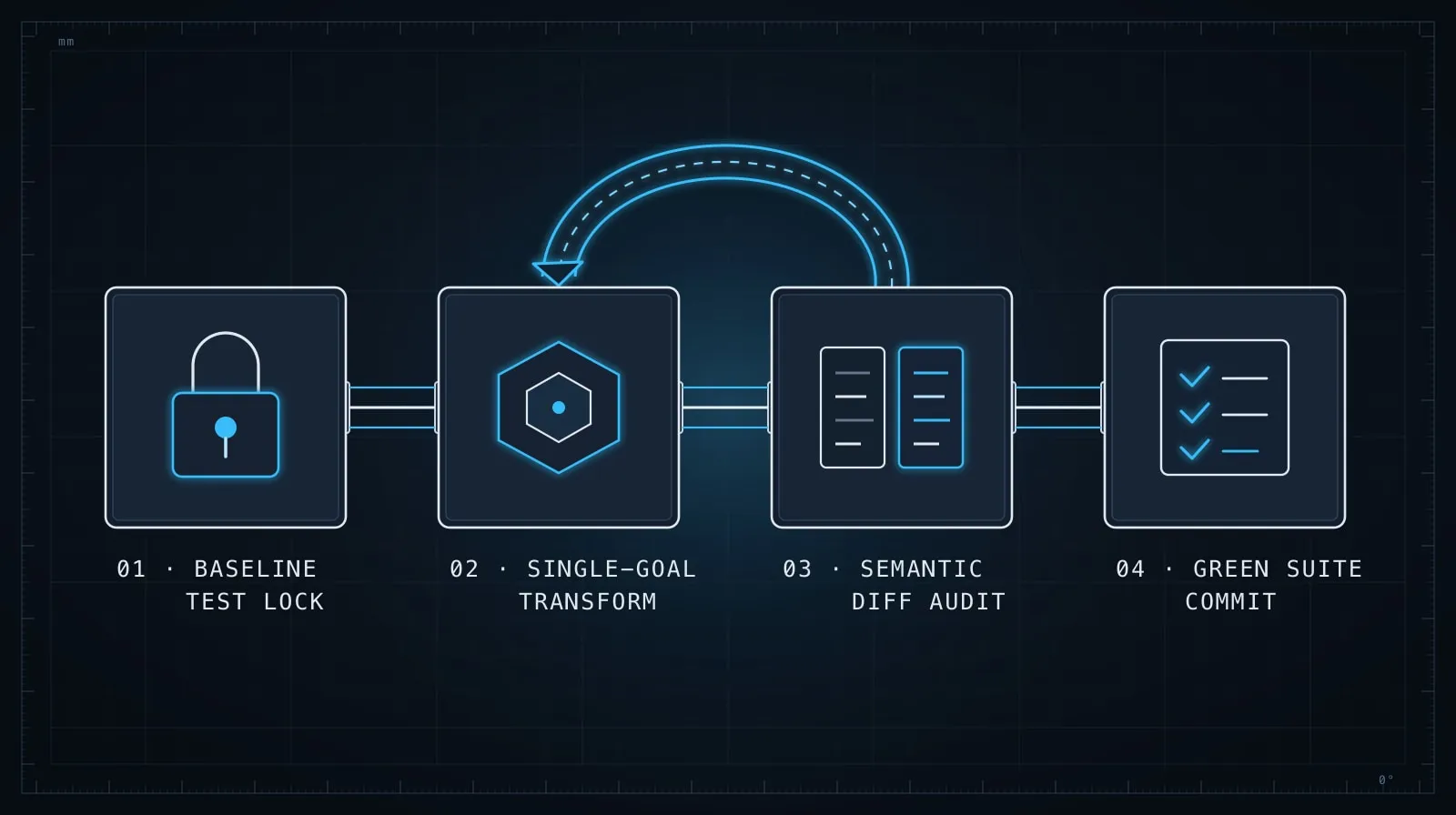
The most common mistake in AI-assisted refactoring is asking for too much at once. “Refactor this module to be cleaner” produces a diff you can’t review confidently. Instead, give the AI one specific transformation:
- Extract this logic into a pure function
- Replace these callbacks with async/await
- Convert this class to a module with explicit exports
- Replace this switch statement with a lookup table
One transformation. One review. One commit. The cumulative effect of small, verifiable steps is faster and safer than one large diff you can barely read.
# Weak prompt
Refactor `src/lib/payments.ts` to be cleaner and more modern.

# Strong prompt
In `src/lib/payments.ts`, the `applyDiscount` function uses a nested
if-else chain. Extract the discount calculation logic into a lookup
table keyed by discount type. Don't change the function signature,
the tests, or any other logic in the file.
The phrase “don’t change anything else” does real work. It limits the model’s instinct to opportunistically improve unrelated things while it’s in the file.
Give the model the right context
For refactoring, context is the call sites as much as the code itself. A function that looks unused might be called dynamically. A parameter that looks redundant might satisfy an interface somewhere else.
Before asking for a refactor, show the model:
- The function or module being changed
- Its test file
- Any interfaces or types it implements
- A representative call site
Here's the function I want to refactor: [paste]
Here's its test file: [paste]
Here are the TypeScript interfaces it must satisfy: [paste]
Here's how it's called in production: [paste]

Task: replace the callback-based API with a Promise-based one.
Change the signature from:
  fetchUser(id: string, callback: (err: Error | null, user: User) => void): void
to:
  fetchUser(id: string): Promise<User>

Don't touch anything else.
With explicit evidence of the calling convention and interface constraints, the model is far less likely to produce a refactor that silently breaks compatibility elsewhere.
Review for semantic drift, not just syntax
When you review an AI-generated refactor, the question isn’t “does this look right?” — it’s “does this mean the same thing?” Syntax can be correct while semantics drift.
Early returns that change behavior. A guard clause at the top of a refactored function can short-circuit code paths that the original fell through to.
Evaluation order changes. Refactors that convert sequential imperative code to a .map()/.filter() chain can shift when side effects run.
Removed error handling. Cleaner code often has less error handling. Compare the original’s catch blocks and null checks with what survived.
// Original
async function saveProfile(data: ProfileData) {
  try {
    await db.update(data);
    await cache.invalidate(data.userId); // runs even if db.update throws
  } catch (err) {
    logger.error(err);
    return false;
  }
  return true;
}

// AI refactor — shorter, but behavior changed:
// cache.invalidate no longer runs on error
async function saveProfile(data: ProfileData) {
  await db.update(data);
  await cache.invalidate(data.userId);
  return true;
}
The refactored version is cleaner. It’s also wrong if invalidating cache after a caught DB error was intentional. The characterization tests from step one are what catch this.
The clean diff that wasn’t — Josh: I accepted a refactor almost identical to the
saveProfileexample above — the AI version was shorter, and I approved it on a quick read. It had quietly movedcache.invalidateoff the path that ran after a caught DB error. Users saw stale data for minutes after a failed save, and it took a production incident to trace it back to that “clean” diff. Characterization tests would have caught it in seconds — I hadn’t written any because the change “looked trivial.” That’s the exact rationalization this post is arguing against.
Run tests after every atomic step
After each transformation, run the tests immediately. Don’t accumulate multiple AI refactors and run them together — when something breaks, you won’t know which change caused it.
# After each refactor step
npm test && git add src/lib/payments.ts && git commit -m "refactor: extract discount lookup table"
Committing after each green test step gives you a clean history and makes it trivial to revert a step that turns out to be wrong. AI-assisted refactoring should produce a series of small, reviewable commits — not one massive “refactor module” commit that’s impossible to audit later.
Ask the model to explain what it changed
After generating a refactor, ask the model to account for its own changes:
Summarize the changes you made. For each change:
1. What did you change?
2. Why — what problem in the original does this address?
3. Are there any behavior differences between the original and the
   refactored version, even minor ones?
This forces the model to account for every change rather than just produce an output. It also gives you a plain-language diff narrative you can use to confirm the model understood the scope correctly. If the model can’t explain why it made a specific change, look closely at that change before accepting it.
Know when not to use AI for a refactor
AI is least useful when:
- The code encodes complex business rules that aren’t visible in the source itself — the semantics are only knowable from domain knowledge or tribal history
- The refactor scope is genuinely large (thousands of lines) and can’t be decomposed into atomic steps without making architectural decisions along the way
- The module has no tests and no stable interfaces, so there’s no safety net for catching drift
In these cases, AI is still useful for reconnaissance — explaining what code does, suggesting a decomposition strategy, helping you understand what a function is actually computing — but the transformation itself should stay in human hands until you’ve built enough structure to make verification possible.
The compounding benefit
Scoped, tested, incremental AI-assisted refactoring compounds over time. Each module you clean up this way becomes more navigable — by you, by your team, and by AI tools in future sessions. Well-named, well-typed, well-tested code is easier for AI assistants to reason about accurately. The discipline of keeping refactors atomic and verified makes every future AI interaction faster and more reliable.
Good refactoring practice makes AI assistance better. And AI assistance makes refactoring faster — but only in that order. The safety net comes first.
For the code review discipline that applies after any AI-generated change lands in your diff, see Evaluating AI-Generated Code Before It Ships. And when a refactoring session runs long across multiple modules, the context hygiene in Managing Context in Long AI Coding Sessions will keep the model from re-proposing approaches you’ve already ruled out.