AI-Assisted Code Migrations: Moving Between Frameworks, Versions, and Patterns
How to use AI to plan and execute code migrations reliably — from class components to hooks, callbacks to async/await — without introducing silent regressions.
Code migrations are a uniquely good fit for AI assistance. They’re large, repetitive, and pattern-driven — the kind of work where a human loses focus and makes mistakes precisely because it’s so mechanical. An AI doesn’t lose focus. It also doesn’t understand your codebase the way you do, which is why migrations fail badly when you hand one to an AI without structure.
The discipline isn’t about whether to use AI for migrations. It’s about how to keep it from silently introducing regressions while it applies transformations at scale.
Establish the transformation rule before touching the codebase
The most common migration mistake is starting with the files. Start with the rule.
Before pointing an AI at any code, articulate exactly what the transformation is — input pattern, output pattern, and the invariants that must hold. The clearest way to do this is to write a representative before/after pair yourself, then show it to the AI and ask it to confirm its understanding.
Here is the transformation we're applying across the codebase.
Please confirm you understand it, including any edge cases I haven't listed.

BEFORE (class component with lifecycle):
class Timer extends React.Component {
  state = { count: 0 };
  componentDidMount() { this.interval = setInterval(() => this.setState(s => ({ count: s.count + 1 })), 1000); }
  componentWillUnmount() { clearInterval(this.interval); }
  render() { return <div>{this.state.count}</div>; }
}

AFTER (function component with hooks):
function Timer() {
  const [count, setCount] = useState(0);
  useEffect(() => {
    const id = setInterval(() => setCount(c => c + 1), 1000);
    return () => clearInterval(id);
  }, []);
  return <div>{count}</div>;
}

Invariants:
- Cleanup logic from componentWillUnmount must move into the useEffect return
- getDerivedStateFromProps and getSnapshotBeforeUpdate are out of scope — flag them
- componentDidUpdate with conditional logic is out of scope — flag it
- Props types stay unchanged
That “out of scope — flag it” instruction is important. Migrations always have edge cases the simple rule doesn’t cover. You want the AI to identify them rather than silently attempt them.
Pilot on one representative file
Before running the migration across your codebase, apply it to a single file that you know well. One you can review quickly and confidently.
Apply the class-to-hooks transformation to src/components/UserCard.tsx only.
Do not modify any other file.
Read the output carefully. Verify that the transformation is correct, that types still match, that no behavior has been silently altered. If the pilot file has any of the edge cases you marked as out-of-scope, you’ll catch them here — before they’ve propagated to 80 files.
Once the pilot passes review, you have a working example. Paste it into subsequent prompts as a reference so the AI is applying a concrete pattern, not re-deriving one from your verbal description.
Migrate file by file, not in batches
It’s tempting to hand the AI a directory and say “migrate everything in here.” Resist this. Migrating multiple files in one request conflates their concerns, makes it harder to spot errors, and produces diffs that are painful to review.
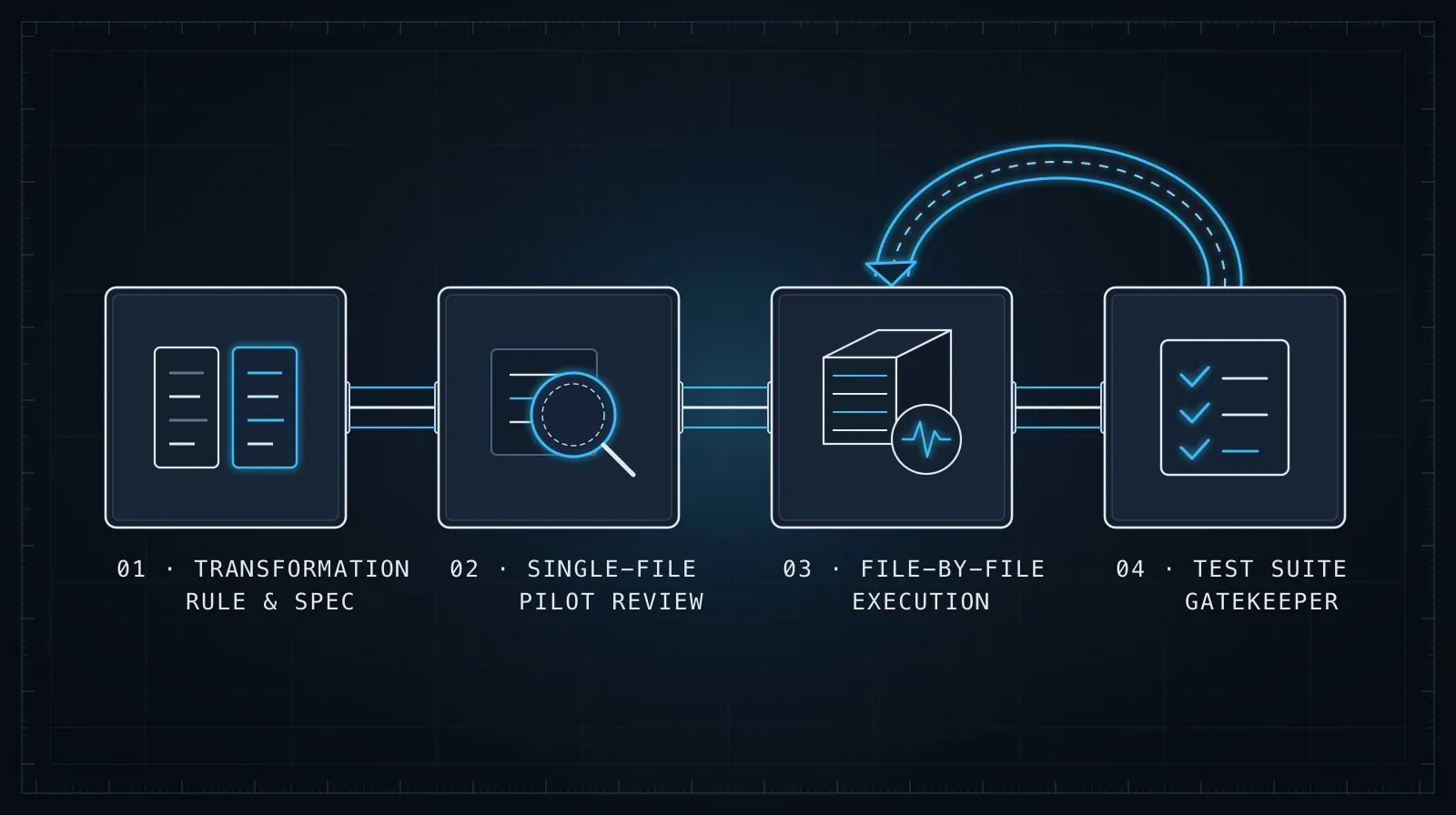
The right approach depends on how automated your process is:
For supervised migration (AI + human review): do one file per prompt. Verify each output before continuing. Slow but safe, and appropriate for critical modules.
For automated migration with test verification: batch files by concern (all components in one pass, all utility functions in another), but run your test suite after each batch and treat failures as blockers, not warnings.
Either way, never migrate files that contain the out-of-scope edge cases you identified. Put those on a separate list and handle them manually or in a focused follow-up session.
Common migration patterns and their pitfalls
Callbacks to async/await
This is one of the cleaner transformations, but it has a specific failure mode: callback-based APIs that signal multiple events, not just completion. EventEmitter, Node.js streams, and some older file-system patterns don’t convert cleanly to a single await. They need wrapping logic, not a straight substitution.
// BEFORE
fs.readFile(path, 'utf8', (err, data) => {
  if (err) throw err;
  processData(data);
});

// AFTER
const data = await fs.promises.readFile(path, 'utf8');
processData(data);
Tell the AI explicitly: any callback that calls back more than once (progress callbacks, event handlers) is out of scope and must be flagged.
CommonJS to ESM
The transformation looks simple — require() to import, module.exports to export — but the semantics differ. CommonJS require() is synchronous and can appear anywhere in a function. ESM import is static and must be at the top level. Dynamic requires that appear conditionally or inside loops have no direct ESM equivalent.
// BEFORE
const config = require('./config');
module.exports = { setup };

// AFTER
import config from './config.js';
export { setup };
The reliable instruction: flag any require() call that isn’t a top-level, unconditional import. Those need manual handling.
Test framework migrations (e.g., Jest to Vitest)
Test migrations are usually the most straightforward, because the APIs are deliberately similar. The main risks are:
- Global test helpers that aren’t auto-imported in the new framework
- Timer mock APIs that differ between frameworks
- Snapshot serializer differences that cause false failures
Run the migrated test suite in watch mode rather than CI on the first pass. The failures you see are bugs in the migration, not in the application code. Review them as a set before fixing individually — often they share one root cause.
Use your test suite as the verification layer
The only reliable way to know a migration is correct is to have a passing test suite before and after. If you don’t have tests, the migration has to be much slower and more careful — it becomes a reading comprehension exercise, not a mechanical transformation.
Before you start, confirm the tests pass on the pre-migration code. After each file or batch, run the tests again. A migration that breaks tests is a blocked migration, not a migration to push through and fix later. This connects directly to the discipline in Evaluating AI-Generated Code Before It Ships: treat each migrated batch as generated code that needs verification before it goes further downstream.
What to do when the AI gets it wrong
Two failure modes come up repeatedly:
Inventing APIs. When migrating to a newer library version, AI assistants sometimes generate calls to methods that don’t exist in the target version — they exist in a version the model knows about from training, but the API changed. Always check generated method calls against the actual installed version’s docs before accepting output. A quick grep for unfamiliar method names in the node_modules source is faster than tracking down a runtime error.
Losing a subtle behavior. Class component shouldComponentUpdate semantics, specific Promise rejection handling, or order-dependent side effects — these are easy for an AI to miss if they’re not explicitly called out. When reviewing migrated code, focus your attention on the control flow, not the happy path. The happy path is usually correct. The error handling, the cleanup, and the edge conditions are where silent regressions hide.
If a file has any non-trivial logic that you’re uncertain about after reviewing the AI’s output, write a characterization test against the original code before accepting the migration. Run the same test against the migrated version. This is slower, but for complex logic it’s the only rigorous option.
The right division of labor
The AI’s job in a migration is to apply a known transformation repeatedly and flag exceptions. Your job is to define the transformation, verify the pilot, review the flagged exceptions, and run the verification suite. That division produces migrations that are both fast and safe.
What it doesn’t do is eliminate the human judgment call at the boundary. Deciding which files are in scope, what the edge cases are, and whether a failing test represents a real regression or a test that was already wrong — those stay with you. The AI accelerates the mechanical work; the architectural judgment is still yours.
For complex feature-level changes that involve migration alongside new development, the task decomposition approach in Task Decomposition for AI Coding Agents applies directly: separate the migration tasks from the new feature tasks, run them in sequence with verification checkpoints between, and don’t mix concerns in a single agent session.
Migrations handled this way are faster than doing them by hand, more consistent than automated codemods that don’t understand context, and more reliable than handing the whole thing to an AI without structure. The discipline takes twenty minutes to set up. The alternative costs days to untangle.