Keeping Secrets Out of Your AI Coding Sessions
A practical guide to sharing the right context with AI assistants without exposing API keys, credentials, and sensitive data that creates security risk.

AI coding assistants need context to be useful, and context always means sharing: sharing code, sharing error messages, sharing configuration. The discipline most developers skip is deciding what not to share — and that gap creates real security risk.
This isn’t hypothetical. When you paste a stack trace with a connection string in it, share a .env file to explain a config issue, or include real API keys in an example prompt, that data enters an external system. How it’s stored, logged, or used for training depends on the provider and tier. Even when the risk is low, the habit is bad — because the same carelessness that exposes a staging API key eventually exposes a production one.
Here’s how to build a workflow that keeps AI sessions useful without making them a liability.
What counts as sensitive
The obvious ones first:
- API keys and tokens (third-party services, internal APIs, OAuth tokens)
- Database connection strings, which often embed credentials inline
.envfiles with real values- Private keys and certificates
- Passwords and secrets of any kind
Less obvious but equally sensitive:
- PII embedded in example data: real user emails, names, or addresses in test fixtures or log output
- Internal service hostnames and private infrastructure URLs
- Business logic that constitutes a trade secret — proprietary algorithms, unreleased pricing, unpublished product plans
- Database schema details that reveal sensitive product direction
The rule of thumb: if the data would cause damage to your company or users if it appeared publicly, it doesn’t belong in an AI session.
The .env.example pattern
The most common accidental exposure pattern is this: you’re debugging a configuration issue and paste your .env file to explain the problem. The variable names make sense in context, but so do the values — and you’ve just shared real credentials.
The fix is already in your repo: .env.example. When you need to explain a configuration issue, share the example file, not the real one. If you don’t have one, now is a good reason to create it.
A well-structured .env.example:
# Third-party integrations
STRIPE_SECRET_KEY=sk_test_your_key_here
SENDGRID_API_KEY=your_sendgrid_api_key

# Database
DATABASE_URL=postgres://user:password@localhost:5432/myapp

# Auth
NEXTAUTH_SECRET=generate_with_openssl_rand_base64_32
NEXTAUTH_URL=http://localhost:3000
Placeholder values like your_key_here and generate_with_openssl_rand_base64_32 communicate the format and purpose of each variable without exposing any real credential. The model gets exactly the context it needs to help with configuration code — it doesn’t need to see sk_live_4xKENjkqmFyDB....
Sanitizing logs before sharing
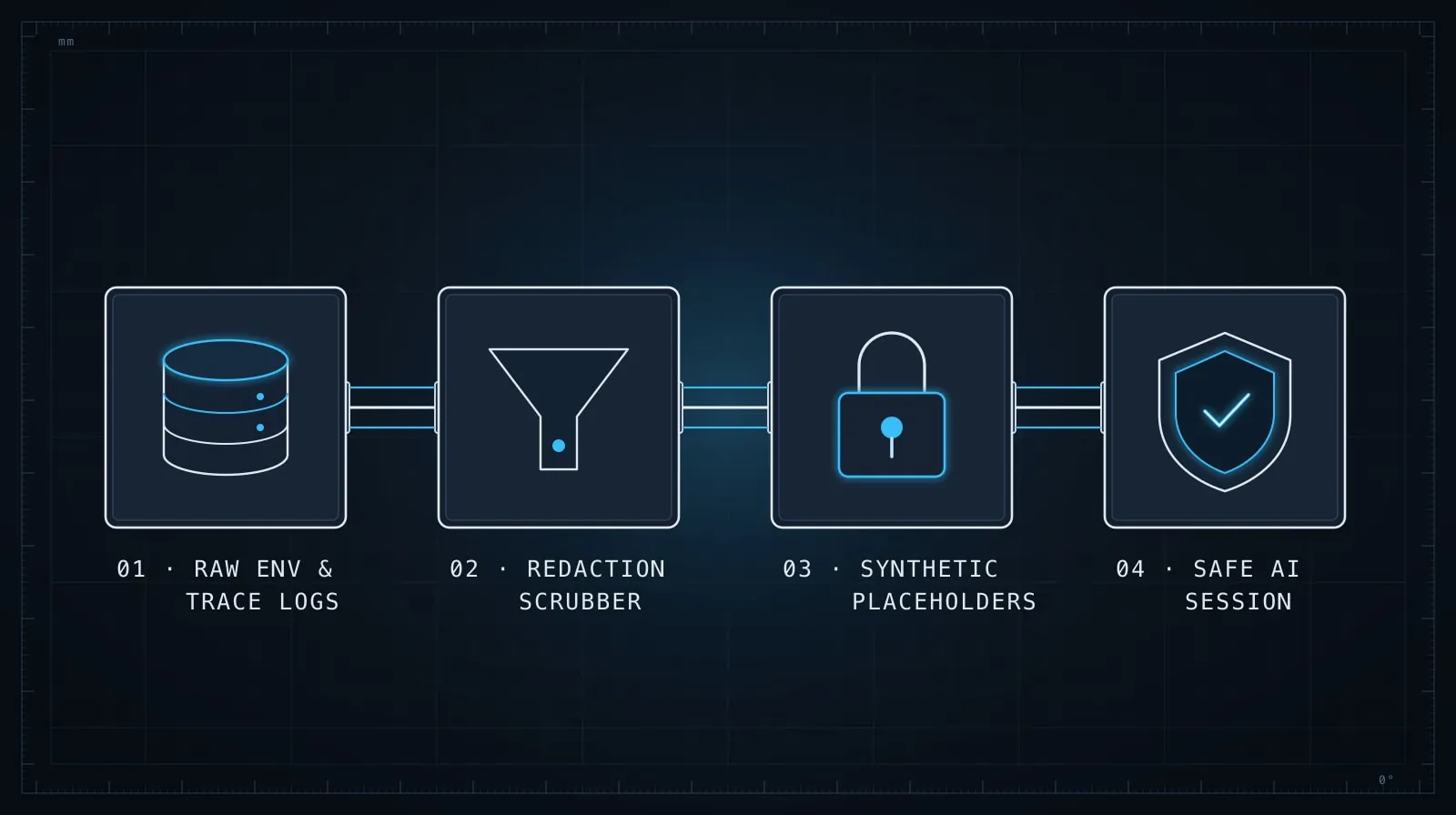
Log output and error traces are the other common exposure vector. A database error that includes a connection string, an HTTP error that includes an Authorization header, a crash dump that prints environment variable values — these all appear in real logs.
Before sharing any log output with an AI assistant, scan it for these patterns:
# Scan for common sensitive patterns before sharing
grep -iE "(password|secret|key|token|auth|bearer|basic|credential)" error.log
grep -E "postgres://|mysql://|mongodb://" error.log
grep -E "Authorization:|X-API-Key:" error.log
If you find hits, redact the values before pasting. Replace sensitive content with a placeholder that describes what it is:
# Original — don't share this
Error: ECONNREFUSED connecting to postgres://admin:[email protected]:5432/users

# Sanitized — safe to share
Error: ECONNREFUSED connecting to postgres://[USER]:[PASSWORD]@[DB_HOST]:5432/users
The model doesn’t need the actual hostname, username, or password to help you debug a connection error. Knowing it’s a Postgres connection string with credentials is sufficient context.
Placeholder patterns for example data
When you need to provide example data that demonstrates a problem — a JSON payload, a function argument, a test fixture — use synthetic values that look structurally correct but aren’t real.
For user records:
// Use obviously synthetic values, not real data from your database
const user = {
  id: "usr_00000000000000",
  email: "[email protected]",
  name: "Test User",
};
For API responses:
{
  "id": "pay_00000000000000",
  "amount": 2999,
  "currency": "usd",
  "status": "succeeded"
}
The example.com domain is specifically reserved for documentation and testing. IDs that are obviously synthetic (00000000000000 or usr_EXAMPLE) don’t accidentally resemble production identifiers. These conventions also help if the exchange ever gets referenced elsewhere — there’s no ambiguity that the data is real.
For internal hostnames, use internal.example.com or api.your-company.example.com rather than your actual private infrastructure addresses.
Configuring your project instruction file
Your project’s CLAUDE.md (or equivalent instruction file) is the right place to establish data-sharing rules for everyone working in the project. A dedicated section prevents the “I forgot” failure mode and sets expectations for anyone who opens an AI session in this repo:
## Sensitive data — do not share in sessions

- Never paste `.env` or any file with real credentials. Use `.env.example` instead.
- Redact API keys, tokens, and passwords from logs before sharing.
- Replace real user data (emails, names, IDs) with synthetic values in examples.
- Use `internal.example.com` for any private hostnames.
- Database connection strings: share the URL format with placeholder credentials.
This section loads before every session in tools that read project instruction files automatically. It’s a standing reminder for yourself and a policy statement for anyone else on the team. For more on what belongs in a project instruction file and how to structure it effectively, see Writing a CLAUDE.md That Actually Changes How Your AI Codes.
Cloud vs. local models
Not all AI coding tools route through external servers. Local models — running via Ollama, LM Studio, or similar — process everything on your machine and transmit nothing to third-party infrastructure. For code that’s sensitive enough to make cloud sharing a real concern, local models are worth evaluating.
The practical trade-off: local models at a quality level useful for serious coding work require significant hardware (typically a machine with a capable GPU), and the best local models still trail frontier models on complex tasks. For most teams, the right answer is using a cloud model with disciplined data hygiene, not switching to local models to sidestep the problem.
If your organization has data residency or compliance requirements — healthcare, finance, government — check your AI vendor’s data processing agreements. Most frontier AI providers offer enterprise tiers with explicit commitments about training data use and data residency that satisfy common compliance requirements. The right place to address those requirements is in vendor selection and contract negotiation, not in avoiding AI tools altogether.
A quick audit of existing sessions
If you’ve been using an AI coding assistant without thinking about this, a quick review is worth running. Look through recent sessions for any pastes that included real credentials or PII. Check whether your AI tool provider allows you to delete conversation history — most do. Review whether any shared code contained real user data in comments or test fixtures.
For most developers this audit comes up clean. The goal isn’t to create anxiety — it’s to catch any real exposures and establish better habits going forward.
One pattern worth adopting: Before pasting anything into an AI session, spend five seconds asking “would I be comfortable if this appeared in a public GitHub issue?” That bar is high enough to keep the important things out, and low enough that it doesn’t get in the way of working effectively. The structure of your config, the format of your errors, the shape of your data model — all of that is fine to share. The values that grant access to systems or identify real people are what to leave out.
The discipline that ties it together
Sensitive data hygiene in AI sessions is a specific instance of a broader discipline: being deliberate about what you include in context and why. The same principle behind evaluating what goes into an AI session applies to what comes out of it — sensitive data in context can surface in unexpected ways, appearing in generated comments, in example values the model extrapolates from what you shared, or in code that connects to endpoints the model learned from your configuration.
For the broader practice of managing what you include in AI context across a long coding session, see Managing Context in Long AI Coding Sessions. The techniques there — front-loading what matters, creating checkpoints, segmenting by concern — apply equally to keeping sensitive data out: decide at the start of a session what’s safe to share, and treat that as a session constraint rather than a decision you make ad hoc every time you paste something.