Using AI to Write and Optimize Complex SQL Queries
Practical patterns for using AI to write complex SQL — window functions, CTEs, EXPLAIN analysis, and index suggestions — without getting burned by hallucinated columns or the wrong dialect.

SQL is one of the domains where AI coding assistants genuinely shine. A model that has seen enormous amounts of SQL — across dialects, patterns, and complexity levels — can produce a working CTE or window function faster than you can look up the syntax. But most developers use AI for SQL the same way they use it for everything else: a quick question, a rough draft, a trust that it’s probably right. That approach works fine for simple queries and breaks down for anything complex.
The pattern that actually works is more deliberate: give AI your schema upfront, show it the real data problems you’re solving, and iterate with output you can verify. Here’s how to do that.
Front-load your schema
The most common failure mode with AI-generated SQL is hallucinated column names. A model that doesn’t know your schema will invent plausible-sounding column names that don’t exist in your tables.
Fix this by pasting your schema at the top of the session before asking for anything:
-- Schema context: provide this once at session start

CREATE TABLE orders (
  id          UUID PRIMARY KEY,
  customer_id UUID NOT NULL REFERENCES customers(id),
  status      TEXT NOT NULL,  -- 'pending', 'confirmed', 'shipped', 'cancelled'
  total_cents INTEGER NOT NULL,
  created_at  TIMESTAMPTZ NOT NULL DEFAULT now(),
  shipped_at  TIMESTAMPTZ
);

CREATE TABLE order_items (
  id         UUID PRIMARY KEY,
  order_id   UUID NOT NULL REFERENCES orders(id),
  product_id UUID NOT NULL REFERENCES products(id),
  quantity   INTEGER NOT NULL,
  unit_price_cents INTEGER NOT NULL
);
With this in the context, every subsequent query will use your actual column names and types. Add -- constraints for anything non-obvious: which columns are nullable, what the status values actually mean, whether total_cents is always positive. The model will use those comments to write accurate WHERE clauses and aggregations.
For a longer session across multiple tables, include the full DDL rather than an abbreviated description. You’re spending a few hundred tokens on schema; the accuracy improvement is worth it.
Writing complex queries: CTEs and window functions
Once the schema is established, ask directly for what you need. AI handles complex SQL patterns well when you’re specific about the business problem rather than the SQL mechanics:
Using the schema above, write a query that returns each customer's
monthly order count and revenue for the last 12 months, plus a
3-month rolling average of monthly revenue. Include only customers
who placed at least one order in the last 6 months. Use CTEs and
label each step.
The “label each step” instruction is worth adding. A model that names its CTEs monthly_stats, active_customers, and rolling_averages is producing SQL you can read and debug. A model that produces one dense subquery is producing SQL you’ll have to untangle before you can verify it.
The result will look something like this:
WITH monthly_revenue AS (
  SELECT
    customer_id,
    DATE_TRUNC('month', created_at) AS month,
    COUNT(*)                        AS order_count,
    SUM(total_cents)                AS revenue_cents
  FROM orders
  WHERE
    status != 'cancelled'
    AND created_at >= NOW() - INTERVAL '12 months'
  GROUP BY customer_id, DATE_TRUNC('month', created_at)
),
active_customers AS (
  SELECT DISTINCT customer_id
  FROM orders
  WHERE created_at >= NOW() - INTERVAL '6 months'
    AND status != 'cancelled'
),
rolling AS (
  SELECT
    mr.*,
    AVG(mr.revenue_cents) OVER (
      PARTITION BY mr.customer_id
      ORDER BY mr.month
      ROWS BETWEEN 2 PRECEDING AND CURRENT ROW
    ) AS rolling_3m_avg_cents
  FROM monthly_revenue mr
  INNER JOIN active_customers ac USING (customer_id)
)
SELECT *
FROM rolling
ORDER BY customer_id, month;
Verify the output structurally before running it: do the CTEs reference actual columns from your schema? Is the PARTITION BY correct for what you’re computing? Does the date arithmetic match your timezone handling conventions?
Using EXPLAIN ANALYZE to get optimization help
When a query is slow, the most useful thing you can do is run EXPLAIN ANALYZE and bring the output back to the AI:
Here's the output of EXPLAIN ANALYZE on the query above.
The query takes ~3.2s on a table with 8M rows.

Seq Scan on orders  (cost=0.00..423291.00 rows=2000000 width=40)
                    (actual time=0.042..1842.317 rows=1983421 loops=1)
  Filter: (status <> 'cancelled'::text AND created_at > '2025-10-16'::date)
  Rows Removed by Filter: 6016579

What index or rewrite would help most here?
The model can read a query plan. It will correctly identify that this is a sequential scan filtering on status and created_at, and suggest something like a partial index or a composite index:
-- Suggested by AI after reviewing EXPLAIN ANALYZE output
CREATE INDEX idx_orders_active_recent
  ON orders (customer_id, created_at DESC)
  WHERE status != 'cancelled';
The partial index (WHERE status != 'cancelled') is exactly the right call here — it’s smaller than a full index and hits the common case. A model with the plan output can reason about this accurately. Without the plan output, it would guess.
One thing to watch: the model will sometimes suggest indexes that already exist, or suggest a rewrite that’s functionally equivalent to your current query. Always check \d tablename to see what indexes are already present before adding new ones.
Asking AI to explain queries you didn’t write
AI is as useful for comprehension as for generation. When you inherit a query you don’t fully understand, paste it with a simple request:
Explain what this query does, step by step. Identify any potential
correctness problems — especially around NULLs, timezone handling,
or edge cases in the aggregation. Schema is as defined above.
The model will walk through each CTE or subquery and flag subtle issues: a LEFT JOIN that silently drops rows with NULLs in an aggregation, a TIMESTAMPTZ comparison that ignores timezone offsets, a window function with a frame boundary that doesn’t do what the author intended.
This works well as a review step after writing your own queries too. Write the query, then ask the model to find edge cases. It catches class of problems — especially NULL propagation through joins and aggregations — that are easy to miss in code review.
The pitfalls to watch for
Dialect confusion. SQL dialects differ in ways that matter: ILIKE exists in PostgreSQL but not MySQL; DATE_TRUNC is Postgres-specific; ROWNUM is Oracle. If you haven’t told the model your database, it will assume something (usually PostgreSQL or MySQL, depending on context). State your dialect once at the top: “We’re on PostgreSQL 16.”
Invented column names. Even with a schema, models occasionally invent a column name that seems like it should exist. A query referencing orders.discount_cents when that column isn’t in your schema will fail immediately — but if you’re not reading the generated SQL before running it, you’ll spend time on an error that’s obvious in the text.
Outdated syntax. AI training data has a cutoff. Some generated SQL will use patterns that have been superseded by cleaner alternatives in recent versions of your database. If you’re on a recent version, say so, and ask the model to prefer modern syntax where available.
The discipline here is the same as with AI-generated code generally: read before running, verify against your actual schema, test with representative data. As Evaluating AI-Generated Code Before It Ships covers, a structural read — does the shape match what I expect? — catches most problems before they cost you a failed migration or a production query scan.
The workflow that works
The productive loop is:
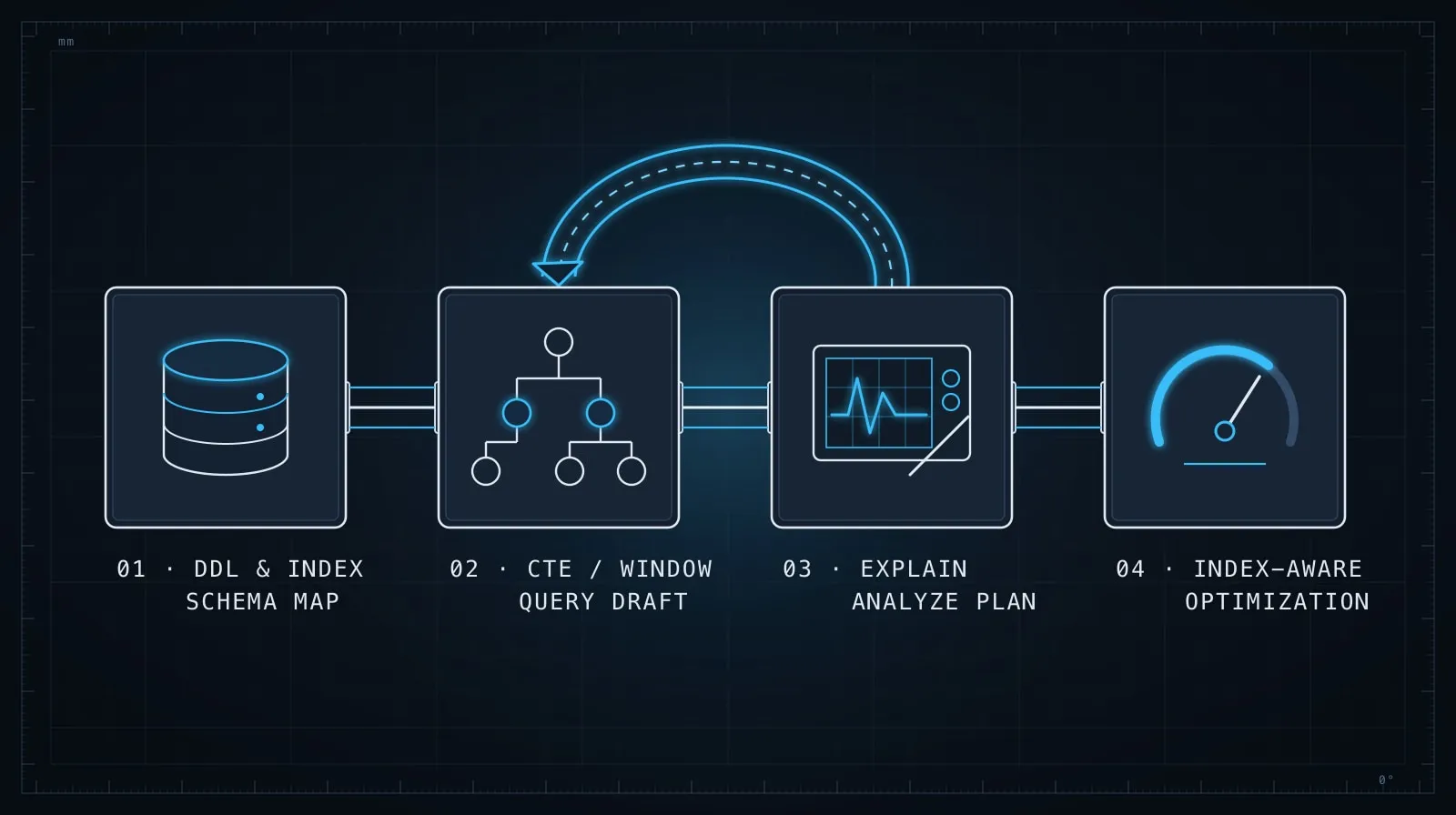
- Paste schema DDL once at the start
- State your database and version
- Describe the business problem, not the SQL mechanics you want
- Ask for labeled CTEs rather than dense subqueries
- Verify column names against the schema before running
- For slow queries, run EXPLAIN ANALYZE and bring the output back
- Ask for edge case analysis as a separate step
SQL is deterministic in a way that freeform code often isn’t — a query either returns the right rows or it doesn’t. That makes it a particularly good fit for AI assistance: the model can produce a complete, executable query in one shot, and you can verify it against real data immediately. The key is giving the model enough context — schema, dialect, business logic — to avoid the hallucinations that make AI-generated SQL frustrating when it goes wrong.
If you’re working in a codebase where queries live alongside application code, Briefing AI on Your Codebase covers how to give the model broader context about how your data layer is structured — so it generates queries that fit your ORM patterns and migration conventions, not just standalone SQL.