AI for Infrastructure as Code: Getting Reliable Terraform, Docker, and Kubernetes From LLMs
How to prompt AI tools for reliable IaC — grounding the model in your provider version, avoiding over-permissive defaults, and validating before you apply.

Infrastructure as Code is one of the best use cases for AI coding assistants — and one of the most dangerous if you treat the output carelessly. Terraform modules, Dockerfiles, and Kubernetes manifests are dense with syntax that’s hard to memorize, but the blast radius of a mistake is significantly higher than a buggy function in application code. A Dockerfile with a hard-coded secret gets shipped to a registry. A Terraform IAM policy with * on the wrong resource gets applied to production. A Kubernetes deployment without resource limits silently starves your other pods.
The discipline isn’t different from working with AI on application code — ground the model, constrain the output, validate before you apply — but the stakes make it worth treating as its own subject.
The core problem: AI IaC is always behind your provider version
Language models have a training cutoff, and Terraform providers, Kubernetes API versions, and Docker base images move fast. An AI assistant may confidently generate a resource using an attribute that was deprecated two major versions ago, reference an API version that was removed from Kubernetes 1.30, or suggest a base image tag that hasn’t been patched in 18 months.
The fix is to ground the model in your exact versions at the start of every IaC session:
Terraform context for this session:
- terraform: ~> 1.9
- hashicorp/aws provider: ~> 5.60
- hashicorp/kubernetes provider: ~> 2.32
- All resources must use the current provider schema — do not use attributes
  marked deprecated in the past two major versions.

If you're unsure whether an attribute is current, say so rather than guessing.
Paste this block before any IaC request in the session, the same way you’d front-load architectural constraints in an application code session. It’s especially important for AWS — the aws provider’s resource schemas change substantially between minor versions.
Terraform: modules, not one-off resources
The most productive way to use AI for Terraform isn’t to generate individual resources one at a time — it’s to generate a complete, parameterized module with variables, outputs, and consistent naming. One-off resources tend to have hard-coded values that break reuse and make the dependency between resources implicit.
A prompt that produces reusable output:
Write a Terraform module for an ECS Fargate service with the following
constraints:
- Inputs: cluster_arn, image_uri, container_port, desired_count, cpu, memory,
  task_role_arn, execution_role_arn, subnet_ids, security_group_ids, environment_vars
- Outputs: service_arn, service_name, task_definition_arn
- The task definition should support environment_vars as a map(string) with
  no hard-coded values
- No log group creation in this module — accept a log_group_name input
- IAM is handled by the caller — this module assumes roles are passed in

Match the variable naming convention in the existing modules in this repo.
Two constraints worth repeating in every Terraform prompt: no hard-coded values (AI has a strong default toward producing readable examples with concrete values, which you then have to manually parametrize), and IAM handled externally (AI routinely creates overly permissive IAM policies because it’s optimizing for “works on the first try”).
That second point matters enough to make it a standing rule in your session constraints: “Do not create IAM roles or policies in this session — assume they are passed in as ARNs.” If you do need IAM generated, ask for it in a separate, focused task where you can review the policies in isolation.
Dockerfile: pin versions and ask for multi-stage explicitly
AI-generated Dockerfiles have two consistent weaknesses: they use unpinned base image tags (node:20 instead of node:20.18.0-bookworm-slim), and they default to single-stage builds that ship build tools to production.
Prompt template that addresses both:
Write a production Dockerfile for a Node.js 20 application:
- Use a pinned, minimal base image (node:20.18.0-bookworm-slim or equivalent)
- Multi-stage build: 'deps' stage for npm ci, 'build' stage for compilation,
  final stage for runtime only — no devDependencies or build tools in the
  final image
- Run as a non-root user in the final stage
- EXPOSE the application port as a build ARG defaulting to 3000
- No secrets, credentials, or .env files copied into the image
The no secrets constraint sounds obvious but it’s worth including explicitly. AI will sometimes suggest COPY .env .env for “convenience in development” and you’ll miss it in review.
After generating, check the final stage specifically: run docker build --target final . and then docker run --rm <image> sh -c "id && ls -la" to verify it’s non-root and that no build artifacts leaked through.
Kubernetes: describe the behavior, review the YAML
Kubernetes YAML is verbose and repetitive — exactly the kind of thing AI handles well. The most effective approach is to describe what the workload should do and let the AI draft the YAML, then review it against your cluster’s actual constraints.
Write a Kubernetes Deployment and Service for a stateless HTTP API:
- Deployment: 3 replicas, rolling update strategy (maxSurge: 1, maxUnavailable: 0),
  resource requests cpu: 100m memory: 128Mi, limits cpu: 500m memory: 256Mi
- Liveness probe: HTTP GET /health, initialDelaySeconds: 15, periodSeconds: 20
- Readiness probe: HTTP GET /ready, initialDelaySeconds: 5, periodSeconds: 10
- Service: ClusterIP, port 80 → containerPort 8080
- No hostNetwork, no privileged containers, readOnlyRootFilesystem: true where possible
- Use namespace: api-prod

Target Kubernetes 1.31. Do not use deprecated APIs.
The resource limits are non-negotiable — include them in every Deployment prompt. A Kubernetes cluster with no resource limits is one poorly-behaved pod away from a cascading failure. AI models know this but won’t always add limits unless you ask.
Review the generated YAML for three things before applying:
- API versions: verify with
kubectl api-versionsthat the versions are available in your cluster - Security context: check for
securityContext.runAsNonRoot: trueandallowPrivilegeEscalation: false - Namespace: confirm the namespace exists and you’re applying to the right one
# Dry-run against your actual cluster before applying
kubectl apply --dry-run=server -f deployment.yaml

# Or validate the schema offline
kubeval deployment.yaml --kubernetes-version 1.31.0
The validation step you cannot skip
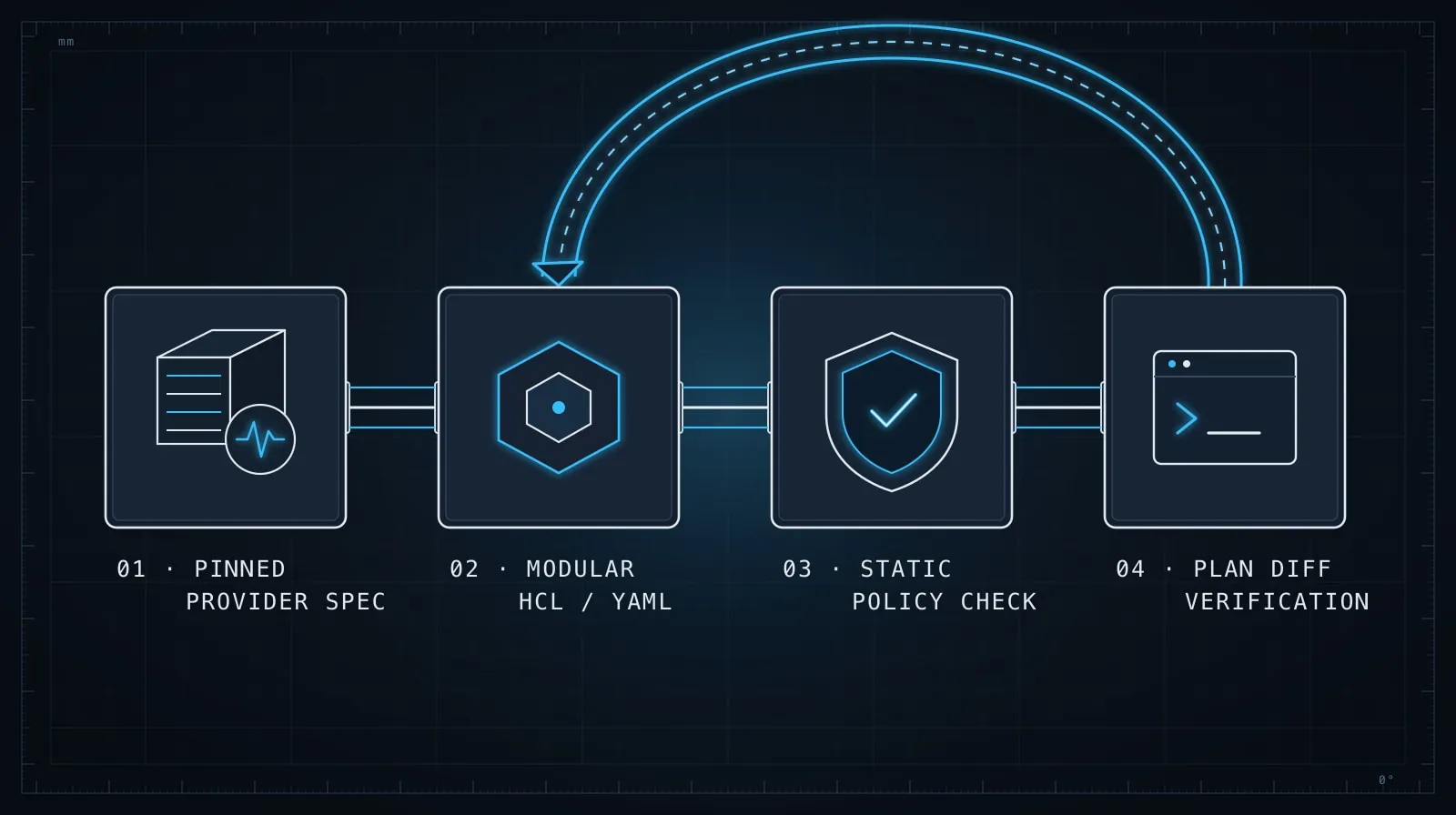
The common thread across Terraform, Docker, and Kubernetes is that AI output needs to pass a machine validation step, not just a visual review. That step is:
- Terraform:
terraform validatethenterraform plan— read the plan output fully before applying - Docker: build and run the image, verify the final layer with
docker history <image> - Kubernetes:
kubectl apply --dry-run=server, then check cluster events after applying
It’s tempting to skip these when the generated code looks right. Don’t. AI can produce syntactically valid IaC that would fail at apply time, and the errors only appear against real infrastructure. The validation tools exist precisely to catch the gap between “valid syntax” and “correct behavior.”
This connects to the same principle behind Evaluating AI-Generated Code Before It Ships: AI output is a strong first draft, not a finished artifact. For IaC, the draft-to-finished gap runs through your cloud provider’s validator, not just your eyes.
Building a reusable IaC prompt library
Once you’ve written prompts that produce good output for your stack, save them. An IaC prompt library in your repository serves the same purpose as a CLAUDE.md — it encodes the constraints your team has learned, so you don’t rediscover them each session.
A minimal library looks like:
.claude/iac-prompts/
  session-context.md    # Provider versions, naming conventions, standing constraints
  terraform-module.md   # Module template prompt
  dockerfile.md         # Dockerfile template prompt
  k8s-deployment.md     # Deployment template prompt
Each file is the prompt you’ve found produces reliable output for that concern. When a provider version changes, update session-context.md. When you find a new constraint worth enforcing, add it to the relevant template.
This approach — codifying what works rather than prompting from scratch each time — applies to AI-assisted infrastructure the same way Writing Effective Project Instruction Files applies to application code. The upfront investment in the prompt library pays back every time a team member would otherwise have spent 20 minutes iterating toward output you already know how to get.
The bottom line
AI handles IaC syntax well. It handles IaC judgment poorly — default IAM policies are too permissive, base image tags drift, resource limits go missing. Your job is to supply the judgment: explicit version constraints, standing rules about what the model must not generate, and validation against real infrastructure before anything is applied.
The same discipline that makes AI useful for application code — front-loading constraints, segmenting by concern, verifying before advancing — works for infrastructure. It just has higher stakes if you skip it.