AI-Assisted Security Code Review: Finding Vulnerabilities Before They Ship
How to use AI coding assistants to systematically spot injection flaws, auth bypasses, and insecure defaults — with prompts that actually surface real problems.

AI coding assistants are reasonable security reviewers, but only if you ask them the right questions. The generic prompt — “is this code secure?” — produces a generic response: a few boilerplate concerns, a reminder to sanitize inputs, and nothing actionable. The same code, asked about in a specific, threat-modeled way, will surface real issues.
This article is about making that shift: from “broadly look for security issues” to “check this specific boundary for this specific class of vulnerability.” The difference in signal quality is substantial.
Why AI finds some security bugs well
Language models have absorbed a large corpus of security writing — vulnerability disclosures, OWASP documentation, CVE write-ups, secure coding guides. They can reason about patterns: recognizing that string interpolation into a query is SQL injection, that a missing authorization check before a database write is a privilege escalation risk, that deserializing user-provided data without validation is dangerous.
What they can’t do without your help is reason about your system’s trust boundaries. They don’t know which arguments are user-controlled, which routes require authentication, or what your authorization model is supposed to enforce. Without that context, they’re guessing — and their guesses about trust are frequently wrong.
The implication: bring the context. The more you tell the model about what’s trusted, what’s untrusted, and what the code is supposed to enforce, the more accurate its security analysis becomes.
Ask about specific vulnerability classes, not “security generally”
Instead of asking for a general security review, pick a class of vulnerability and ask specifically. Here are prompts that reliably produce useful output:
SQL injection and query injection:
Review the following database query code for SQL injection or ORM injection risks.
Assume all function parameters marked with [UNTRUSTED] come directly from HTTP
request input with no prior sanitization. Identify any cases where attacker-controlled
input could modify query structure, escape intended boundaries, or reach the database
in an unintended way.
Authorization bypass:
Review this route handler for authorization bypass. The route is supposed to enforce
that users can only access their own resources. Identify any path where a request
could succeed without the authorization check running — including early returns,
exception handlers, middleware ordering issues, or conditional logic that skips
the check under specific conditions.
Sensitive data exposure:
Review this API response serializer for unintended data exposure. The intent is to
expose only { id, email, displayName }. Check whether any code path could include
additional fields — password hashes, internal IDs, PII fields, session tokens, or
admin flags — in the response, including via object spread, ORM includes, or
serializer misconfiguration.
Each of these prompts names the specific threat model, names what’s trusted and untrusted, and asks a yes/no answerable question. The model responds much more precisely than it would to “check for security issues.”
A concrete example: reviewing a route handler
Here’s a simplified route handler with several issues baked in:
// src/routes/user.ts
app.put('/users/:id/email', async (req, res) => {
  const { id } = req.params;
  const { newEmail, password } = req.body;

  const user = await db.query(
    `SELECT * FROM users WHERE id = '${id}'`
  );

  if (!user) return res.status(404).json({ error: 'Not found' });

  const match = await bcrypt.compare(password, user.password_hash);
  if (!match) return res.status(401).json({ error: 'Invalid password' });

  await db.query(
    `UPDATE users SET email = '${newEmail}' WHERE id = '${id}'`
  );

  res.json({ success: true, user });
});
A prompt like “is this code secure?” might get you: “use parameterized queries, make sure to hash passwords.” You’ll miss that res.json({ user }) leaks the password_hash in the response.
A targeted prompt produces something different:
Review this route handler for three things, in order:
1. SQL injection: flag every place where request input reaches a query string.
   For each one, state the exact parameter and the SQL manipulation an attacker
   could perform.
2. Authorization bypass: this route is supposed to let a user change only their
   own email. Can a user change someone else's email? Show the exact input that
   would do it.
3. Sensitive data exposure: what fields are in the response object? List every
   field returned, including nested ones, and flag any that shouldn't leave the server.
That prompt gives the model a structured scope and asks for attacker-style reasoning. It will correctly identify that id is user-controlled and directly interpolated into both queries, that there’s no session check preventing user A from changing user B’s email (just a password check against the fetched user’s hash), and that the response includes password_hash.
The two-pass approach
A reliable pattern is to run two passes: one for code-level issues, one for design-level issues.
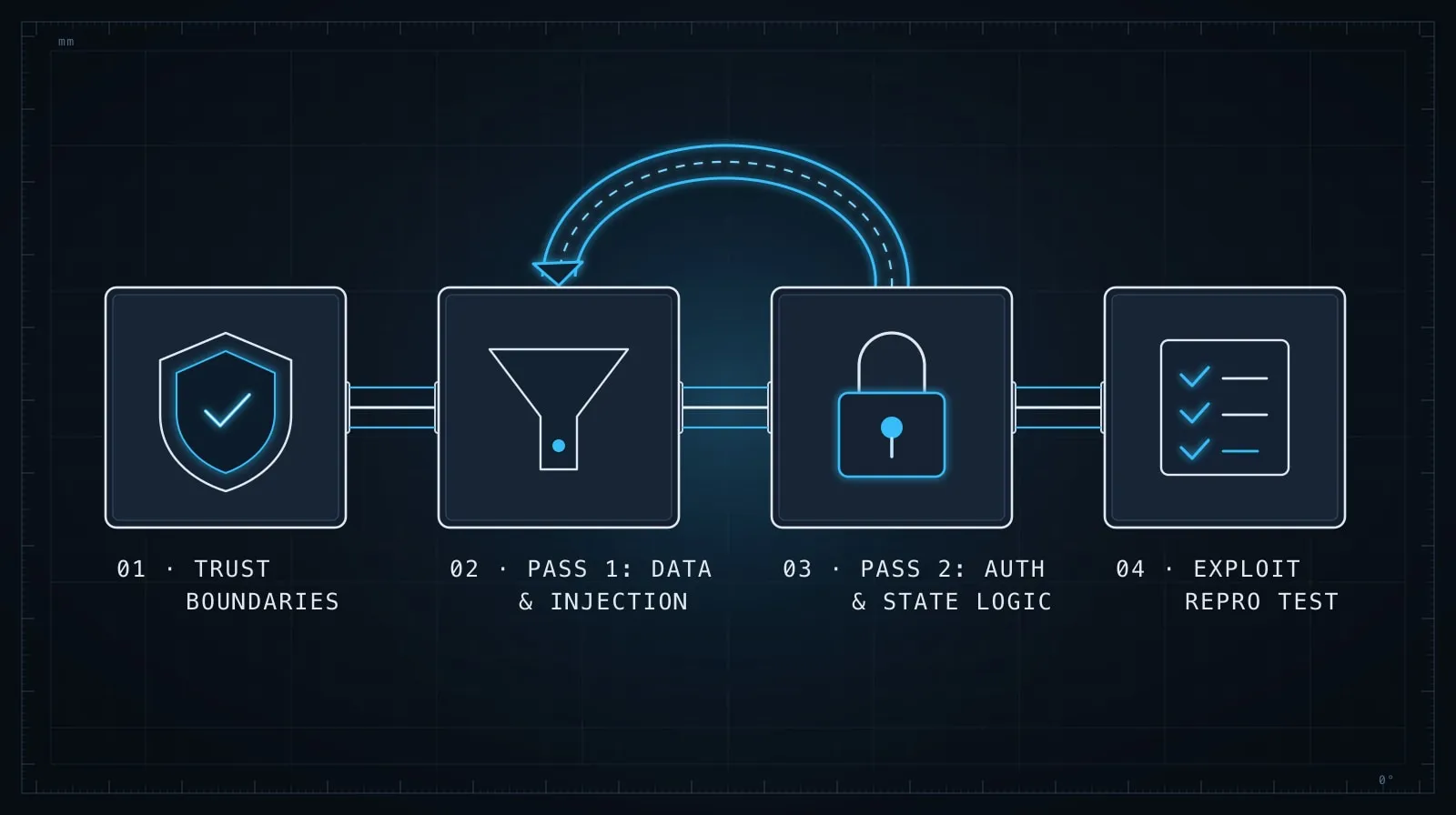
Pass 1 — code-level: Share the actual code. Ask for specific vulnerability classes as above. Take every finding and verify it manually — trace the data flow, confirm whether the finding is exploitable given your actual stack and middleware.
Pass 2 — design-level: Share a description of what the code is supposed to do and what it actually does. Ask the model to identify gaps between the intent and the implementation from a security perspective.
This route is supposed to enforce: users can update their own profile fields
(name, avatar URL) but not their email or password through this endpoint — those
have separate, higher-friction flows. The route receives a PATCH body and writes
allowed fields to the database.

Here's what the route actually does: [paste code]

Identify any gap between the stated intent and the implementation. Focus on
cases where the implementation would allow a user to update fields the intent
prohibits.
Design-level gaps — mass assignment, missing field allowlists, inconsistent enforcement of business rules — are often invisible at the code level but obvious when you describe the intent.
Where AI security review falls short
There are vulnerability classes where AI analysis is structurally unreliable:
Business logic flaws. If a vulnerability requires understanding that a discount code can be applied twice because of a race condition in your specific checkout flow, the model needs your entire checkout flow in context — and even then, race conditions require reasoning about concurrent execution that models don’t do well.
Configuration and infrastructure issues. Misconfigured CORS headers, overly permissive IAM roles, unencrypted fields in a cloud storage bucket — these are visible in infrastructure code but require understanding your deployment topology. The model can flag suspicious patterns, but it can’t verify your actual deployment.
Second-order effects. A function that looks safe in isolation might be dangerous when composed with another. If the model doesn’t see the composition, it can’t flag the risk.
For these, AI review is a starting point, not a final answer. A model that flags nothing doesn’t mean nothing is wrong — it means the model didn’t see the conditions under which the bug triggers.
Building security review into your workflow
The highest-leverage place for AI security review isn’t a one-time audit — it’s the pull request review. For any PR that touches authentication, authorization, or data access code, run a targeted review before the code merges.
A practical setup: keep a security-review.md file in your project with your standard review prompts, tailored to your stack and threat model. When a PR touches auth or data access, paste the relevant code and the relevant prompts, run the review, and add findings to the PR comments.
# security-review.md

## Auth and authorization review
Paste into AI session before reviewing any auth-touching code:

"This app uses [JWT in Authorization header / session cookie / API key].
The auth middleware runs at [describe where]. Protected routes call
[requireAuth() / use('auth')]. Untrusted inputs are [req.body, req.params, req.query].
Review the following for: authorization bypass, missing auth checks, privilege
escalation via parameter manipulation."

## Data access review
[Add your specific prompts here]
The five minutes this adds to reviewing a sensitive PR is far cheaper than the investigation after a data incident. And because the prompts are written once and reused, the investment pays back across every review.
The right mental model
AI security review is a tool for coverage, not a tool for certainty. It catches the injection that you’d catch on a careful manual pass but might miss on a fast one. It surfaces the data leak hiding in a serializer you’ve looked at a hundred times. It reminds you to check the authorization path you didn’t consciously think about.
What it won’t do is replace a threat model, a security design review, or a penetration test. Use it as a fast, cheap first pass that raises the floor — and know the ceiling of what it can reliably reach.
The prompting habits that make AI review useful are the same ones covered in Prompt Engineering Patterns That Survive Production: specific questions, explicit context, structured outputs. A vague prompt produces vague analysis; a precise prompt about a precise threat produces something you can act on. And for AI-generated code that you’re reviewing for security, the evaluation framework in Evaluating AI-Generated Code Before It Ships applies: treat a clean AI security review the same way you’d treat passing tests — evidence, not proof.