Using AI to Write and Validate Database Migrations
A practical guide to using AI coding assistants to write, review, and validate schema migrations — catching destructive operations before they reach production.
Database migrations are one of the highest-stakes files a developer regularly ships. A typo in an ALTER TABLE statement or a missing rollback script can mean data loss, hours of downtime, or an incident at 2am. AI coding assistants can write migrations quickly — but “quickly” and “correctly” aren’t the same thing, and an AI that confidently proposes a DROP COLUMN without flagging that the column is still referenced in three places is more dangerous than no help at all.
This guide covers how to use AI effectively for migrations: a prompting approach that produces safe SQL, how to catch destructive operations before they run, and how to validate that rollbacks actually work.
Why AI needs extra guardrails here
With most code, an AI mistake is caught by a failing test or a runtime error that’s easy to trace. With migrations, the mistake often succeeds — the SQL executes, the column is gone, and the problem shows up hours later when the application hits the now-missing column. The error is silent at the migration layer.
This means the validation step that’s optional for other code is mandatory for migrations. You need to review what the AI produced and explicitly ask it to surface risks, rather than assuming the output is safe because it parsed without errors.
A diff-driven prompting approach
The most reliable way to generate a migration with AI is to give it the current schema and the desired schema, then ask it to produce the steps to get from one to the other. This is more specific than describing the change in words — “add a user preferences column” can mean many things, but a concrete target schema is unambiguous.
Show the AI both states:
-- CURRENT STATE (users table)
CREATE TABLE users (
  id UUID PRIMARY KEY DEFAULT gen_random_uuid(),
  email TEXT NOT NULL UNIQUE,
  created_at TIMESTAMPTZ NOT NULL DEFAULT now()
);

-- TARGET STATE
CREATE TABLE users (
  id UUID PRIMARY KEY DEFAULT gen_random_uuid(),
  email TEXT NOT NULL UNIQUE,
  display_name TEXT NOT NULL DEFAULT '',
  notification_preferences JSONB NOT NULL DEFAULT '{}',
  created_at TIMESTAMPTZ NOT NULL DEFAULT now(),
  updated_at TIMESTAMPTZ NOT NULL DEFAULT now()
);
Then ask explicitly:
Write a Postgres migration that transitions the users table from the
CURRENT STATE to the TARGET STATE. Requirements:

1. Include both an UP migration and a DOWN (rollback) migration.
2. The UP migration must be safe to run against a table that already
   contains rows — every new NOT NULL column needs a DEFAULT or a
   two-step backfill approach.
3. Before the SQL, list every destructive operation in the migration
   (column drops, type changes, NOT NULL additions without defaults)
   and what data will be affected.
4. After the SQL, list any indexes that should be created alongside
   this migration for the new columns.
That final instruction — listing destructive operations before the SQL — forces the model to reason about safety explicitly rather than generating code and hoping you catch the edge cases on review.
Reading the safety report before the SQL
When you ask for a destructive-operations list, you get something like this:
Destructive operations in this migration:
- None. Both new columns are nullable or have non-null defaults,
  so existing rows are unaffected.

New indexes to consider:
- users(display_name) — only if you'll be sorting or filtering by
  display_name in queries. Low cardinality makes this low value unless
  you have specific query patterns that need it.
A migration that adds columns with defaults is safe. But run the same exercise on a riskier migration and the report earns its keep:
Destructive operations in this migration:
- DROP COLUMN legacy_role: this column is being removed. Any application
  code still reading `legacy_role` will fail at runtime after this runs.
  Verify no queries reference this column before deploying.
- ALTER COLUMN amount TYPE NUMERIC(10,2): changes precision from
  NUMERIC(12,4). Values with more than 2 decimal places will be
  silently truncated. Check whether any existing rows have fractional
  amounts before running this.
This is the output that earns AI its place in the migration workflow. It won’t catch every risk, but it catches the obvious ones — and the obvious ones are most of what bites teams in practice.
Validating rollbacks
The DOWN migration is often an afterthought. AI will write one if you ask, but a written rollback and a working rollback are not the same thing. Test them.
Ask the AI to generate a minimal test scenario:
Generate a SQL script that:
1. Creates a test table matching the pre-migration state of `users`
2. Inserts 3 rows with representative data
3. Runs the UP migration
4. Asserts the post-migration state is correct
5. Runs the DOWN migration
6. Asserts the table returned to its original state

Use plain Postgres SQL with DO blocks for the assertions.
The result is a self-contained test you can run against a local or staging database:
-- Setup
CREATE TABLE users_test (LIKE users INCLUDING ALL);
INSERT INTO users_test (email) VALUES
  ('[email protected]'),
  ('[email protected]'),
  ('[email protected]');

-- UP migration
ALTER TABLE users_test
  ADD COLUMN display_name TEXT NOT NULL DEFAULT '',
  ADD COLUMN notification_preferences JSONB NOT NULL DEFAULT '{}',
  ADD COLUMN updated_at TIMESTAMPTZ NOT NULL DEFAULT now();

-- Assert post-UP state
DO $$
BEGIN
  ASSERT (SELECT COUNT(*) FROM users_test WHERE display_name = '') = 3,
    'display_name should default to empty string';
  ASSERT (SELECT COUNT(*) FROM users_test WHERE notification_preferences = '{}') = 3,
    'notification_preferences should default to empty object';
END $$;

-- DOWN migration
ALTER TABLE users_test
  DROP COLUMN display_name,
  DROP COLUMN notification_preferences,
  DROP COLUMN updated_at;

-- Assert post-DOWN state (back to original)
DO $$
BEGIN
  ASSERT NOT EXISTS (
    SELECT FROM information_schema.columns
    WHERE table_name = 'users_test'
    AND column_name = 'display_name'
  ), 'display_name should not exist after rollback';
END $$;

-- Cleanup
DROP TABLE users_test;
Running this against a staging database before the migration goes anywhere near production catches rollback gaps early — when they’re cheap to fix.
Prompting for ORM-level migrations
If you’re using an ORM like Drizzle, Prisma, or SQLAlchemy, the workflow shifts slightly. Show the AI your schema definition file (the ORM model), not raw SQL:
// Drizzle schema — current
export const users = pgTable('users', {
  id: uuid('id').primaryKey().defaultRandom(),
  email: text('email').notNull().unique(),
  createdAt: timestamp('created_at', { withTimezone: true }).notNull().defaultNow(),
});

// Target — what you want it to look like after the migration
export const users = pgTable('users', {
  id: uuid('id').primaryKey().defaultRandom(),
  email: text('email').notNull().unique(),
  displayName: text('display_name').notNull().default(''),
  notificationPreferences: jsonb('notification_preferences').notNull().default({}),
  createdAt: timestamp('created_at', { withTimezone: true }).notNull().defaultNow(),
  updatedAt: timestamp('updated_at', { withTimezone: true }).notNull().defaultNow(),
});
Then ask: “Write the Drizzle migration file that transitions from the current schema to the target schema, following Drizzle’s migration file format. Include the rollback. Flag any operations that might affect existing rows.”
This grounds the migration in your actual ORM types, which catches a class of errors that only exist when the generated SQL doesn’t match what the ORM expects at runtime — type mismatches, column name discrepancies, missing defaults in the ORM definition.
Common pitfalls to watch for
Even with careful prompting, a few patterns recur where AI migrations go wrong:
Column drops without a deprecation phase. A DROP COLUMN in the migration and the application code referencing that column in production are separate deploys. AI doesn’t know which version of your app will be running when the migration executes. Always ask: “Is there any code in this codebase that might still reference this column?” if you have access to a tool that can search your codebase.
NOT NULL columns without defaults on large tables. Adding NOT NULL to a column with existing rows requires either a default value or a multi-step migration: add nullable, backfill, add constraint. AI often skips the backfill step on tables it doesn’t know are large. Ask explicitly: “This table has millions of rows. Is this migration safe to run without a table lock? If not, rewrite it as a safe zero-downtime migration.”
Type changes that truncate silently. Changing TEXT to VARCHAR(100) or narrowing a numeric type doesn’t error if existing values fit — but it silently truncates values that don’t. Ask for a pre-check query: “Write a SELECT that counts how many existing rows would have data truncated by this type change.”
Missing index creation. A new foreign key column without an index on the referencing table will cause full table scans on joins. AI sometimes adds the index, sometimes forgets. Always ask for the index list explicitly, as shown in the prompting template above.
A repeatable workflow
Putting it together, a reliable migration workflow with AI looks like this:
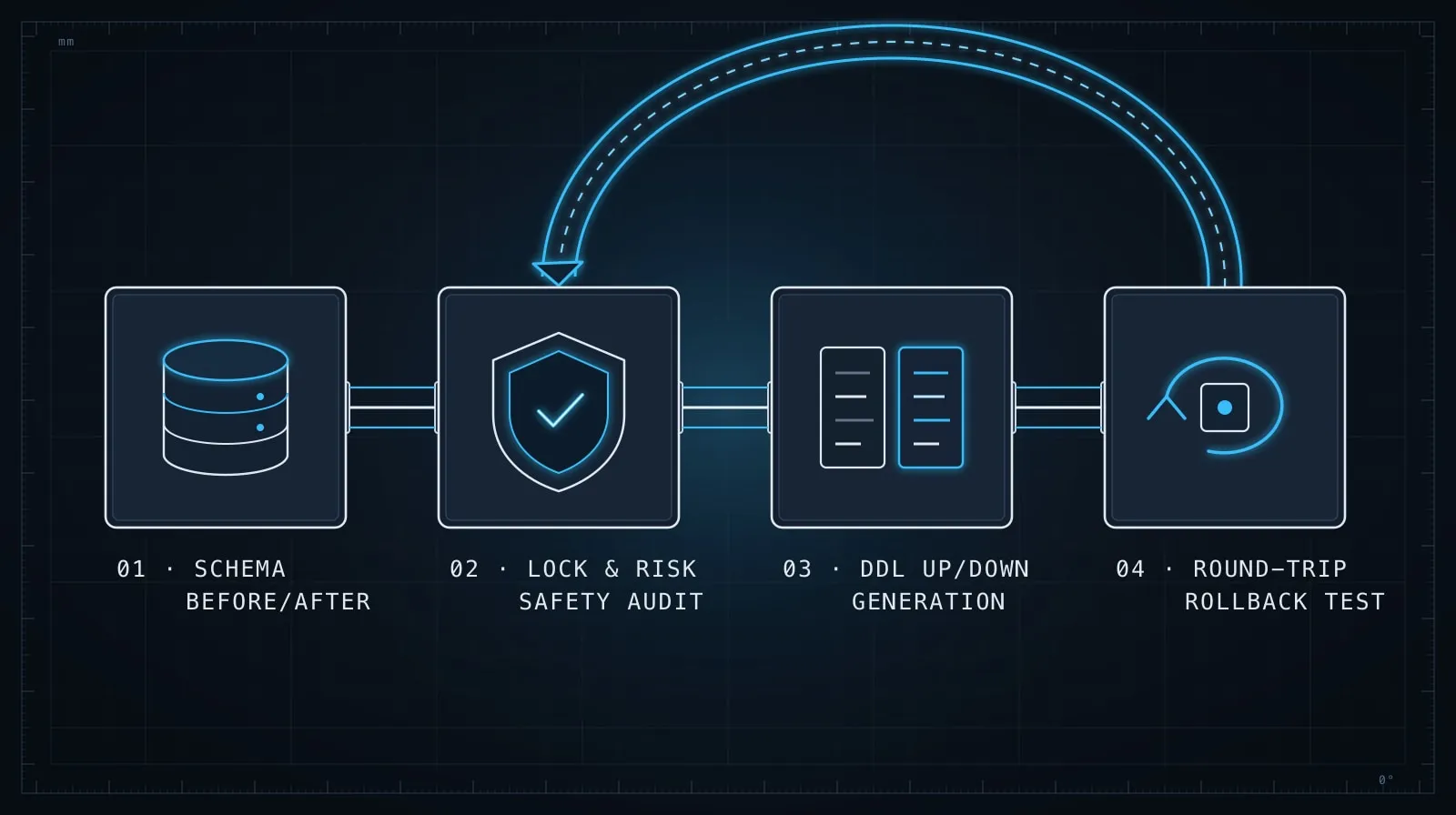
- Show both schemas — current and target. Not a description in words; the actual DDL or ORM definition.
- Require the safety report first — destructive operations listed before the SQL.
- Ask for UP and DOWN together — never generate UP without DOWN in the same prompt.
- Generate a test script — UP/assert/DOWN/assert, runnable against a test table.
- Run it on staging before production — no AI-generated migration goes to production without a real execution on real data first.
The AI is doing the tedious work — writing the SQL, thinking through the rollback, checking column defaults. You’re doing the judgment work — reviewing what it flagged, deciding whether the rollback is adequate, catching risks specific to your data.
The combination is faster and safer than writing migrations by hand, as long as you treat the AI output as a draft that requires your verification, not a finished script that’s ready to deploy. This is the same principle that applies to evaluating any AI-generated code: the value is in the first draft and the explicit risk flags, not in blindly running whatever was generated.