Debugging with LLMs: Give the Model What It Can't Guess
How to structure debugging sessions with an AI assistant — what runtime context to share, how to frame the problem, and how to verify a diagnosis before patching.

AI coding assistants are surprisingly good at debugging — when you give them the right information. The problem is that most debugging sessions start with the wrong frame: you paste the broken code and ask “what’s wrong?” But the model doesn’t have access to your runtime, your logs, or the state that triggered the failure. It has to guess from static text.
The difference between a useful debugging session and a frustrating one comes down to how much of the invisible context you make visible.
Start with the error, not the code
The most common mistake is pasting the code and describing the symptom in vague terms: “this function isn’t working right.” Start instead with the exact error — the full message and stack trace, copied verbatim.
Models are well-calibrated on error messages. A TypeError: Cannot read properties of undefined (reading 'map') at a specific line tells the model something concrete. “It’s not working right” tells it nothing.
# Weak framing
Here's my fetchUsers function. It's not returning the right data sometimes.

# Strong framing
Here's the error I'm seeing:
  TypeError: Cannot read properties of undefined (reading 'map')
  at UserList (UserList.tsx:23)
  at renderWithHooks (react-dom.development.js:14985)

It happens when the page loads for users with no prior activity.
Here's the component:
[code]
The phrase “for users with no prior activity” is load-bearing. It tells the model the failure is conditional — which immediately points toward a missing null check on data that only exists in some cases.
Include what changed
If something broke after a change, show the model the diff. Static code looks the same whether it’s always been that way or changed five minutes ago. The model can’t see your git history.
git diff HEAD~1 -- src/lib/auth.tsA model shown + const session = req.headers.authorization.split(' ')[1] in a diff will immediately spot that the original had a null check that got dropped. Without the diff, it’s looking for what’s wrong in what’s there, not what’s missing.
If there’s no recent change and the bug is latent, say that explicitly: “this code hasn’t changed in months and the bug started appearing after a deploy of a different service.” That steers the model toward interface contracts and environment differences rather than the code itself.
Surface the runtime state
The most useful context is often not in the code at all — it’s the data that was present when the failure occurred. Log it, copy it, paste it in.
// Add a temporary diagnostic log before the crash site
console.log('[debug] user at line 23:', JSON.stringify(user, null, 2));
console.log('[debug] items type:', typeof items, Array.isArray(items));
Then share both the log output and the code with the model. “The user object at that point was { id: 42, profile: null }” eliminates half the hypothesis space immediately. The model doesn’t need to speculate about whether profile could be null — you’ve confirmed it.
If the failure happens in an environment you can’t easily instrument — a CI pipeline, a production service — paste the relevant surrounding log lines. Models are good at reading log context and spotting what was in flight when something went wrong.
Ask for hypotheses, not just a fix
When you ask “what’s the bug?”, the model tends to propose the first plausible fix it sees. That fix is often right — but it’s also often addressing a symptom rather than the root cause.
A better prompt asks the model to enumerate possible causes before settling on one:
Here's the error and the relevant code. Before suggesting a fix, list
the 3-4 most likely root causes in order of likelihood. For each one,
describe what evidence would confirm or rule it out.
This produces an investigation rather than a patch. You’ll often find that the model’s second or third hypothesis matches what you know about the runtime state better than the first. It also forces you to read the reasoning rather than just copy the code change.
Verify the hypothesis before you patch
Once you have a plausible cause, add instrumentation to confirm it — don’t apply the fix first. If the model’s hypothesis is “the items array is undefined on first render,” verify that before changing the code:
// Temporary assertion to test the hypothesis
if (items === undefined) {
  console.error('[hypothesis] items is undefined — hypothesis confirmed');
} else if (!Array.isArray(items)) {
  console.error('[hypothesis] items exists but is not an array — different problem');
} else {
  console.log('[hypothesis] items is an array of length', items.length);
}
This takes 60 seconds and it matters. Blindly applying a fix to an unconfirmed hypothesis is how you end up with two bugs instead of one, or a patch that hides a symptom instead of resolving the root cause. This is the same failure mode described in Evaluating AI-Generated Code Before It Ships — fixes that suppress errors rather than resolving them.
A trap I fell into — Josh: I skipped this verify step once because the model’s first hypothesis sounded obviously right. I applied the null-guard it suggested, the error vanished, and I shipped. The real cause was upstream — a caching layer handing back stale
undefined— and my guard just hid it until it resurfaced a week later as a much stranger bug that took a full afternoon to trace. Sixty seconds of instrumentation up front would have saved me two debugging sessions. I don’t patch an unconfirmed hypothesis anymore.
Close the loop when the first hypothesis is wrong
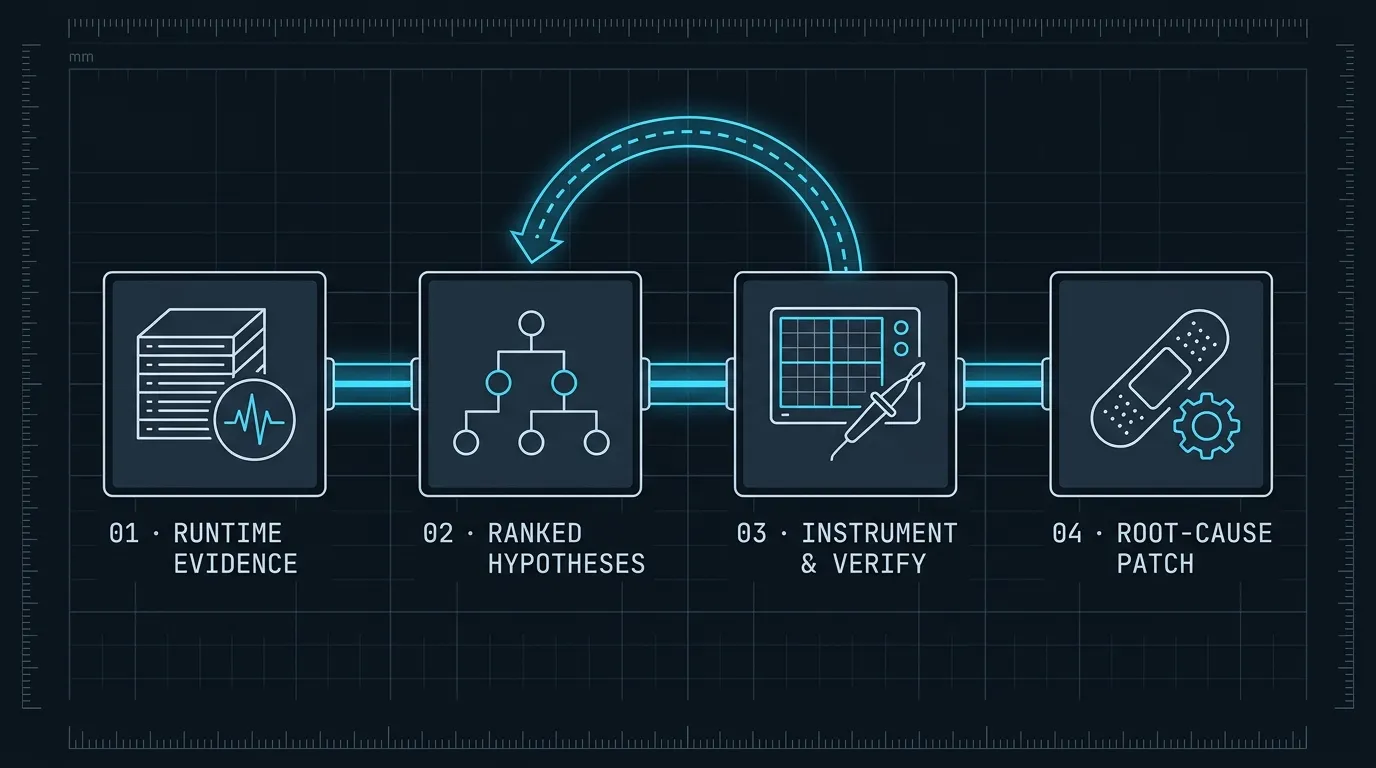
If the instrumentation shows the model’s hypothesis was wrong, feed that back explicitly. “Your hypothesis was that items is undefined, but the log shows items is an empty array [], not undefined” — now the model has new evidence and will revise.
Most developers stop after the first failed suggestion. The model is better used iteratively: give it evidence, get a hypothesis, test the hypothesis, report the result, repeat. Each confirmed or disconfirmed evidence round narrows the space significantly.
# Round 2 prompt structure
Your first hypothesis was X. I checked with this log:
  [log output]

X is not the issue — items is an empty array, not undefined. The
crash still happens. What else could explain this error given that
items is [] and user.profile is null?
Treating the model as a collaborator that updates its beliefs on new evidence, rather than an oracle that should get it right in one shot, changes the dynamic entirely.
A reusable debugging prompt template
If you debug with AI regularly, keep a template you can fill in quickly:
## Error
[full error message and stack trace]

## Reproduction condition
[what inputs / state / sequence triggers it]

## What changed recently
[relevant diff, or "no recent changes"]

## Runtime state at failure
[logged values, request payload, DB record, environment specifics]

## Already ruled out
[previous hypotheses that didn't pan out]

## Ask
List the top 3 root cause hypotheses. For each, describe how to confirm it.
The “already ruled out” field is particularly valuable — it prevents the model from cycling back to suggestions you’ve already tested. When a debugging session spans multiple exchanges, paste this summary at the start of a fresh conversation rather than carrying a long back-and-forth that includes irrelevant earlier turns.
Context is the model’s only window into your system
The underlying principle is that a language model doing debugging has no special access to your runtime, your data, or your environment. Everything it can reason about has to come through text. The more precisely you describe what the system was doing when it failed, the more precisely the model can reason.
This is different from asking the model to generate new code, where it can work forward from a specification. Debugging requires reconstructing state from evidence — and you’re the one with access to that evidence.
For the prompting discipline that makes all of this more reliable — structured framing, escape hatches, output contracts — see Prompt Engineering Patterns That Survive Production. And when the bug lives inside an agent loop rather than ordinary application code, the internals in Build Your First AI Agent in TypeScript show exactly where to add per-step logging to make each tool call and model response visible.