Writing Better Error Messages with AI
How to use AI assistants to turn cryptic exceptions and terse error strings into clear, actionable messages that save debugging time for everyone.

Error messages are the part of a codebase that nobody designs and everybody reads. They accumulate as developers realize things can fail, written with mental focus on the code path — not on the person who will see the message at 2 am when something breaks. The result is a sea of Something went wrong, Invalid input, and Failed to process request.
AI coding assistants are unusually good at this problem. They have absorbed vast amounts of documentation, error reports, and debugging sessions. They understand what information a developer or operator needs when they encounter a failure, and they can generate that information from context you already have in your code. The bottleneck is knowing how to ask.
What a useful error message actually does
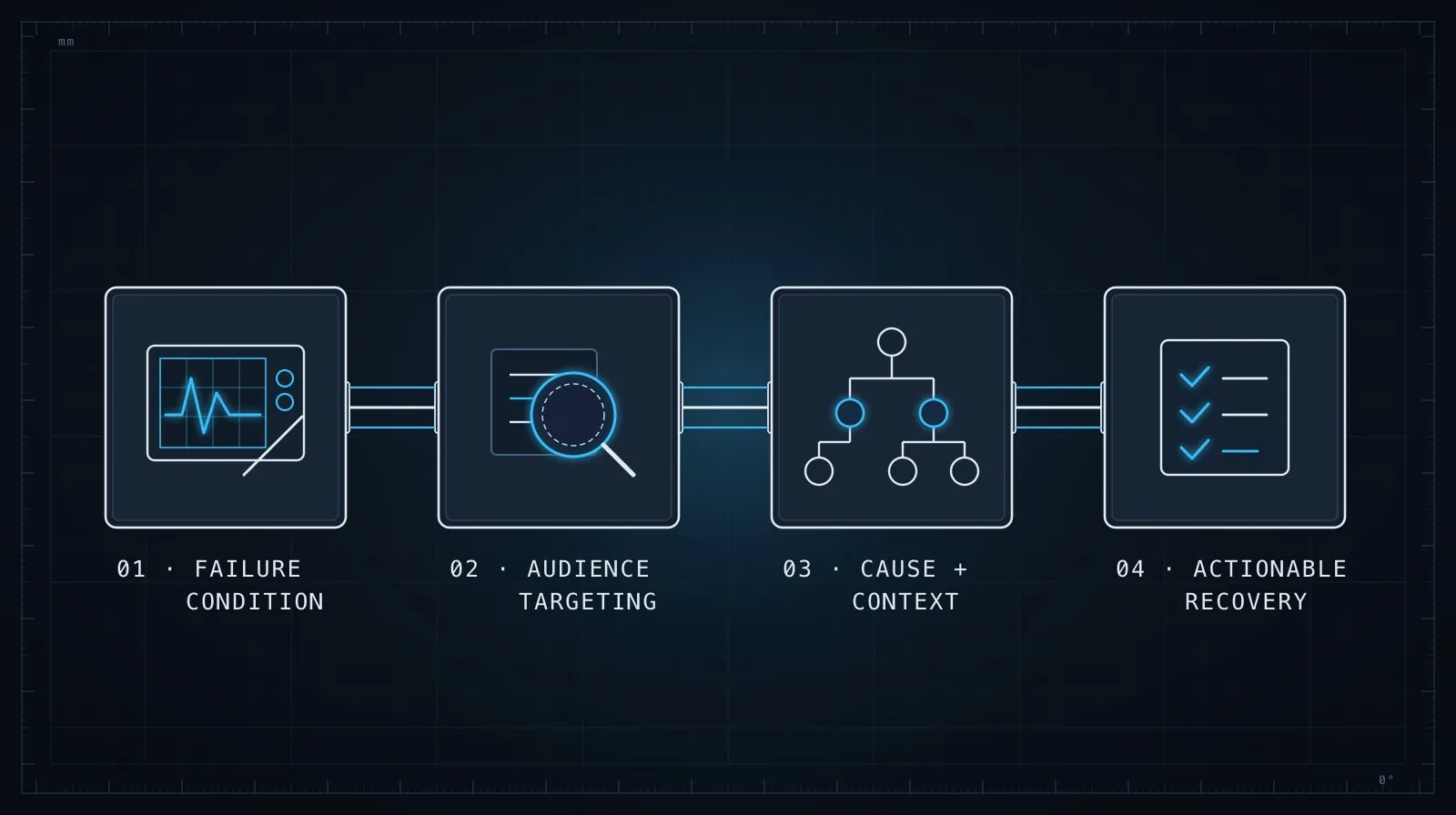
Before prompting, it helps to have a concrete target. A useful error message answers four questions:
- What happened? Describe the failure, not just that it occurred.
- Where? Give enough context to locate it — the function, the input, the state.
- Why? If the reason is knowable at the point of failure, say it.
- What next? If there is a recoverable path or a likely fix, include it.
Most production errors answer only question 1, badly. AI can fill in the rest — but only if you give it the context to work from.
The core prompt pattern
The most important thing to include in your prompt is the audience. Who will read this error, and in what context?
You're looking at the validatePaymentMethod function in src/billing/validate.ts.
It throws errors that appear in two places:
1. In our API response body as { error: { code: string, message: string } }
2. In our server logs for internal debugging

Rewrite the thrown errors so that:
- The `message` field is useful to a developer consuming our API
  (not an internal implementation detail, not empty)
- The `code` field is a stable, machine-readable identifier in SCREAMING_SNAKE_CASE
- The log content includes the actual values that caused the failure

Current code:
[paste the function]
This prompt does three things: it tells the AI who will read the error, in what format, and what job each part of the error needs to do. Without that, the AI writes something that looks plausible in isolation but doesn’t fit your error handling shape or your actual users.
Before and after: a concrete example
Here is the kind of error handling that accumulates naturally as code evolves:
function validatePaymentMethod(payment: PaymentInput): void {
  if (!payment.cardNumber) {
    throw new Error("Invalid payment");
  }
  if (payment.expiryYear < new Date().getFullYear()) {
    throw new Error("Card expired");
  }
  if (!payment.cvv || payment.cvv.length < 3) {
    throw new Error("Bad CVV");
  }
}
These messages are not wrong, but they are not useful. “Bad CVV” tells a developer nothing about what bad means. “Card expired” drops the value that would let someone verify the comparison. “Invalid payment” is useless to anyone.
After providing the prompt above with this function:
function validatePaymentMethod(payment: PaymentInput): void {
  if (!payment.cardNumber) {
    throw new ValidationError(
      "MISSING_CARD_NUMBER",
      "Card number is required",
      "payment.cardNumber was not provided"
    );
  }

  const currentYear = new Date().getFullYear();
  if (payment.expiryYear < currentYear) {
    throw new ValidationError(
      "CARD_EXPIRED",
      `Card expired: expiry year ${payment.expiryYear} is before ${currentYear}`,
      `payment.expiryYear=${payment.expiryYear}, currentYear=${currentYear}`
    );
  }

  if (!payment.cvv || payment.cvv.length < 3) {
    throw new ValidationError(
      "INVALID_CVV",
      "CVV must be at least 3 digits",
      `payment.cvv length=${payment.cvv?.length ?? "undefined"}`
    );
  }
}
The machine-readable code field lets API consumers handle specific errors programmatically. The message is developer-useful without leaking card details. The internal log string captures the actual values for debugging — which is what was missing from every original message.
Specifying the audience changes everything
AI will produce fundamentally different messages depending on who you tell it is reading:
- End users: “We couldn’t process your payment. Please check your card details and try again.”
- API consumers:
CARD_NUMBER_MISSINGwith a message like “Required field missing: cardNumber” - Internal logs:
validatePaymentMethod: card number absent; userId=1234, amount=99.99 - CLI tool users: “Error: config not found at ~/.config/app/config.json — run
app initto create one”
If you give AI a function without specifying the audience, it defaults to something in the middle — often too terse for users and too vague for debugging. One sentence in your prompt about who reads the error and you will get targeted results instead of generic ones.
Infrastructure code is the worst offender
Infrastructure errors tend to be the most opaque, written for the error condition rather than the operator who encounters it in production. A typical database connection failure:
# Before
raise ConnectionError("Database connection failed")
After prompting with: “This runs in a containerized service. The person reading this is an operator, likely seeing it in a Kubernetes log, not a developer who wrote the code”:
# After
raise ConnectionError(
    f"Failed to connect to Postgres at {host}:{port} "
    f"(database={database}, user={user}): {original_error}. "
    f"Verify DB_HOST and DB_PORT in the environment. "
    f"Egress to port {port} must be allowed by the network policy."
)
The enriched version includes the connection parameters, the underlying network error, and a recovery hint specific to the deployment context. None of that comes from the AI unprompted — it comes from telling it who reads this and where.
A focused review pass for a PR
The most effective way to use AI for error messages is as a dedicated review pass, not an afterthought. When a PR lands, a quick targeted review catches what general code review misses — because reviewers focus on correctness, not on the human experience of failures:
Review only the error messages, exceptions, and log statements in this diff.
For each one, tell me:
1. Who will see this message in practice?
2. Does it give them what they need to act on it?
3. What would you change?

[paste the diff]
Ten minutes of this kind of review consistently surfaces three to five high-value changes per PR — messages that are technically present but practically useless to the person who will eventually see them.
A lesson from production — Josh: We had an error reading
"Operation failed: undefined"appearing in client logs for three months before someone tracked it down. The code was correct — the error was real — but the message had lost its subject somewhere in an async chain. When I finally asked Claude to review our async error handling with the question “who sees this and what do they need,” it caught four similar problems in fifteen minutes. The message was not wrong, just useless to anyone outside the function that threw it.
Auditing an entire error module for consistency
Beyond individual messages, AI can review an entire error module for consistency. If your codebase has a documented error convention — specific code formats, required fields, audience conventions — you can ask AI to verify that new code follows the same pattern:
Our error conventions are documented at the top of src/errors/index.ts.
Review the new errors added in src/billing/validate.ts and identify any
that don't follow the convention: different code format, missing required
fields, or messages that don't match our intended audience (internal API consumers).
This works especially well in codebases that have grown multiple error-handling patterns organically. Divergences tend to appear at module boundaries or after team changes, exactly the places that accumulate the most inconsistency over time. AI spots those gaps faster than grep and with more nuance than a lint rule.
When vague messages signal a structural problem
Better error messages are partly a downstream reflection of better code structure. When you ask AI to improve an error message and it produces something awkward or verbose, that is often a signal that the function itself is doing too much.
Well-structured functions have error conditions that are easy to describe precisely, because each condition corresponds to a specific, understood failure state. If the AI has to write a paragraph to explain what went wrong, the throw site probably needs to be moved closer to where the failure actually originates — not just wordsmithed.
If an error message sounds vague, sometimes the right fix is earlier in the code than the throw statement.
For more on making failure conditions explicit before they reach the throw, see Prompting for Defensive Code on structuring code so failures are obvious and predictable. And for keeping AI grounded in your actual types and interfaces as you work — which prevents a whole class of error-handling mistakes — see Type-Driven AI Development.